

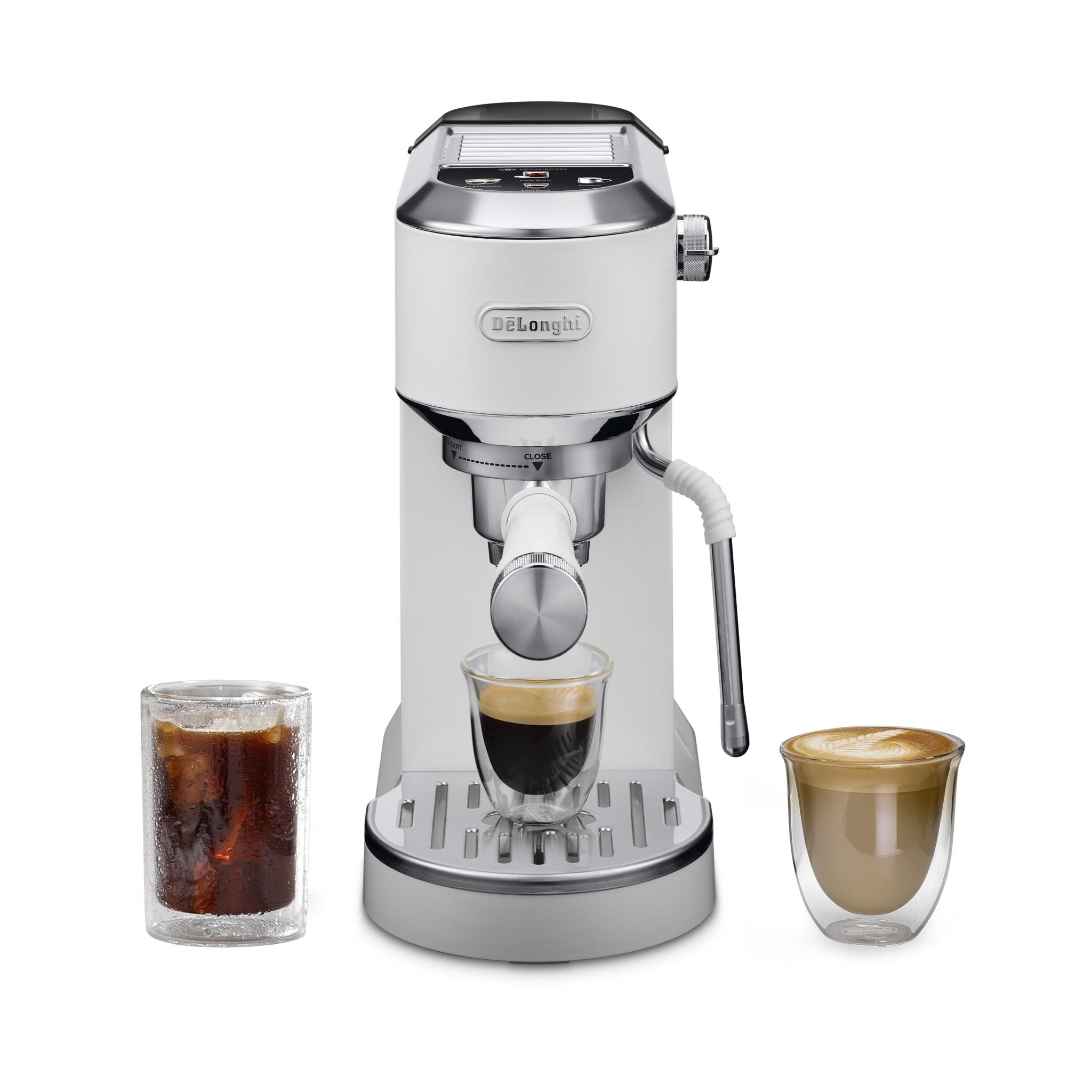
The De'Longhi Dedica Duo is the most versatile machine in the Dedica lineup — a compact 9-bar semi-automatic espresso machine that brews both hot espresso and cold brew using proprietary Cold Extraction Technology. It's designed for beginners who want café-quality results without a steep learning curve, and for anyone who drinks iced espresso drinks as much as hot ones. This guide covers everything: first use, hot espresso, cold brew, the My LatteArt steam wand, customizing your settings, cleaning, and troubleshooting.
View the De'Longhi Dedica Duo at Altohaus →
What's in the Box
- Dedica Duo espresso machine (model EC890)
- 1-liter removable water tank
- 51mm portafilter
- Single shot filter basket (1-cup)
- Double shot filter basket (2-cup)
- E.S.E. pod filter
- Professional metal tamper
- Coffee measuring scoop
- Cleaning needle (for steam wand)
- Water hardness test strip
- Quick start guide and instruction manual
Key Specifications
| Model | De'Longhi Dedica Duo EC890 |
| Colors available | White, Rose (Altohaus); also Pistachio Green |
| Pump pressure | 9-bar extraction pressure |
| Pre-infusion | Yes — low-pressure pre-infusion |
| Brew modes | Espresso, 2x Espresso, Cold Brew |
| Heat-up time | 25 seconds (hot espresso) |
| Cold brew time | Under 5 minutes |
| Water tank | 1L removable |
| Portafilter | 51mm |
| Width | 5.9 inches — slim countertop footprint |
| Steam wand | My LatteArt cool-touch manual wand |
| Temperature settings | Low / Medium / High |
| Auto-off settings | 9 minutes / 30 minutes / 3 hours |
| E.S.E. pod compatible | Yes |
| Display | Digital touch display with full-color icons |
| Descaling indicator | Yes — automatic alert (B5) |
| Warranty | 2-year manufacturer warranty (De'Longhi US) |
| Support | support.delonghi.com / 1-800-322-3848 |
Digital Touch Display Overview
- Cold Brew (B1) — activates Cold Extraction Technology for iced drinks
- Steam (B2) — engages steam mode for milk frothing
- Espresso (B3) — brews a single espresso shot
- 2x Espresso (B4) — brews a double espresso shot
- Descaling Indicator (B5) — lights up when descaling is needed
- On/Off Switch (A6) — main power
- Steam Knob (A4) — controls steam and hot water flow
First Use: Setting Up Your Dedica Duo
Before brewing, all removable parts need to be washed and the internal circuits need to be primed.
- Wash all removable parts — water tank, portafilter, filter baskets, drip tray, scoop, and milk jug (if included) in warm water with mild detergent. Rinse thoroughly. Wipe the tamper with a cloth.
- Fill the water tank to the MAX line with fresh, cold water. Reinsert it firmly.
- Prime the machine — place a container (minimum 500ml) under the brew head and steam wand. Turn the steam knob to steam position to release air from the system. Press the Espresso button to start water flow. Let water run until the tank is nearly empty. Return the knob to position '0' and refill the tank. The machine is now primed and ready.
- Power on using the On/Off switch (A6). If in standby mode, press any control panel icon to wake it.
- When all indicators (except B5) are lit steadily, the machine is ready.
How to Brew Hot Espresso
- Power on and wait for all indicators to illuminate steadily — machine is ready in approximately 25 seconds.
- Preheat the portafilter by running a flush cycle without coffee before your first shot of the day. This improves extraction temperature significantly.
- Select your filter — 1-cup for single espresso (~7g), 2-cup for double (~14g). For E.S.E. pods, use the pod filter.
- Dose and tamp — fill the basket evenly and tamp firmly with the included professional tamper. A level, consistent tamp produces consistent results.
- Lock the portafilter — insert into the group head and rotate to the CLOSE position until firmly locked.
- Place your cup(s) under the portafilter spouts. Adjust the drip tray height for taller glasses by removing the upper section.
- Press Espresso or 2x Espresso on the digital display. The machine extracts with low-pressure pre-infusion followed by consistent 9-bar extraction.
- The machine auto-stops when the preset volume is reached. Serve immediately.
How to Make Cold Brew with Cold Extraction Technology
The Dedica Duo's Cold Extraction Technology produces cold brew in under 5 minutes — far faster than traditional cold brew methods. This isn't cold brew in the traditional steeping sense; it's a cold extraction process that uses the machine's pump at a lower temperature to produce a concentrated cold coffee ideal for iced drinks.
- Ensure the machine is powered on and ready.
- Fill your glass with ice and place it under the portafilter spout.
- Dose and tamp coffee as you would for hot espresso — same dose, same technique.
- Lock the portafilter into the group head.
- Press the Cold Brew button (B1) on the digital display.
- The machine will extract coffee directly over your ice. The process takes under 5 minutes.
- Add milk, water, or your preferred mixer once extraction is complete.
Frothing Milk — My LatteArt Steam Wand
The Dedica Duo features De'Longhi's My LatteArt cool-touch steam wand — designed to produce silky microfoam suitable for latte art with less effort than a traditional wand. The cool-touch exterior makes it safer and easier to handle and clean.
- Always brew your espresso first.
- Press the Steam button (B2) on the display. The machine will preheat for steam mode.
- Purge the wand — turn the steam knob to steam position briefly to release any residual water. When only steam comes out, turn back to '0'.
- Fill your pitcher with cold milk just below the spout line. Cold whole milk produces the best microfoam.
- Position the wand just below the milk surface at a slight angle to encourage a swirling motion.
- Turn the steam knob on — you'll hear a soft hissing. The milk should swirl and rise as foam develops.
- Lower the pitcher gradually as the foam builds to maintain the tip just below the surface.
- When the pitcher is too hot to hold comfortably, close the steam knob and press Steam (B2) to exit steam mode.
- Wipe the wand immediately with a damp cloth. Use the cleaning needle to clear the tip if blocked.
Making Hot Water
For hot water (tea, americanos), press Steam (B2) and turn the steam knob to the hot water position instead of steam. Hot water flows from the wand without activating the steam function.
Customizing Your Settings
Temperature Settings (Low / Medium / High)
The Dedica Duo has three temperature settings. To adjust:
- With the machine on and ready, press and hold the Steam button (B2) for approximately 5 seconds until all indicators flash
- Press Espresso (B3) to cycle through temperature options — the number of indicator lights shows the current setting
- Press Steam (B2) to save the selected temperature
Higher temperature settings suit darker roasts; lower settings suit lighter, more delicate roasts.
Auto-Off Settings (9 min / 30 min / 3 hours)
To change auto-off duration:
- Hold Steam (B2) for ~5 seconds until indicators flash
- Press Steam (B2) again to cycle through auto-off options
- Press Espresso (B3) to confirm the setting
Customizing Espresso Volume
To reprogram the shot volume for Espresso or 2x Espresso:
- Lock in the portafilter with coffee as normal
- Press and hold Espresso (B3) or 2x Espresso (B4) until the indicator flashes
- The machine will begin brewing — press the same button again when you've reached your desired volume
- The new volume is saved for all future shots
Cleaning & Maintenance
After Every Use
- Remove portafilter, discard puck, rinse with warm water
- Wipe My LatteArt steam wand immediately after use with a damp cloth
- Use the cleaning needle to clear the steam tip if milk has dried inside
- Briefly turn the steam knob to purge any residual milk from inside the wand
- Empty and rinse the drip tray
- Wipe the machine exterior with a damp cloth
Weekly Deep Clean
- Remove filter baskets from the portafilter and soak in warm soapy water, then rinse
- Clean the water tank with mild detergent, rinse thoroughly
- Run a flush cycle (Espresso with no coffee) to clean the brew group
- Wipe the cup warming plate on top of the machine
Descaling
The Dedica Duo has an automatic descaling indicator (B5) that lights up when the machine needs descaling. When it appears:
- Empty the drip tray and water tank
- Pour De'Longhi descaling solution (EcoDecalk) into the water tank and fill to MAX with water
- Remove the portafilter. Place a container (minimum 1L) under the brew head and steam wand
- Press and hold Steam (B2) and 2x Espresso (B4) simultaneously for 10 seconds to start descaling mode
- Follow the on-screen indicator sequence — the full cycle takes approximately 30 minutes
- Run a rinse cycle when prompted to flush out residual descaler
Troubleshooting Common Issues
Machine not brewing / no coffee output
Check the water tank is full and properly seated. Ensure the portafilter is locked in the CLOSE position. If the grind is too fine or tamp too firm, flow may be blocked — adjust one variable at a time. If descaling indicator (B5) is lit, descale before resuming use.
Espresso tastes bitter
Grind is too fine, dose is too high, or brew temperature is too high. Try reducing dose, going one step coarser, or lowering the temperature setting. Pre-infusion should be helping — if bitterness persists, the issue is most likely grind size.
Espresso tastes sour or weak
Under-extraction — grind too coarse, dose too low, or machine not preheated. Run a flush cycle before the first shot and ensure your grind is fine enough for espresso. Check that the temperature setting isn't on the lowest level.
Cold brew tastes bitter
Go one step coarser on your grind for cold extraction. Cold Extraction Technology works differently from hot espresso — a slightly coarser grind at lower temperature typically produces a better-balanced result.
Descaling indicator (B5) is lit
The machine needs descaling — follow the descaling procedure above. Do not ignore the indicator; scale buildup reduces performance and can damage the boiler over time.
Steam wand producing little or no steam
The wand tip may be clogged. Use the cleaning needle included with the machine to clear the tip. If blockage persists, soak the tip in warm water. Ensure the machine has fully reached steam temperature before attempting to froth.
Machine in standby / won't respond
Press any control panel icon to wake from standby mode. If the machine doesn't respond at all, check the power connection and ensure the On/Off switch (A6) is in the on position.
Official De'Longhi Resources
- Dedica Duo Official Product Page — full features, FAQs, and support resources from De'Longhi
- Dedica Series Manuals — download the EC890 instruction manual
- Dedica Duo First Time Setup — Official YouTube — official De'Longhi setup video guide
- De'Longhi Support Center — troubleshooting, FAQs, and service requests
- De'Longhi Full Manuals Library — search by model number EC890
- De'Longhi Customer Support (US): 1-800-322-3848
Warranty Information
The De'Longhi Dedica Duo is covered by a 2-year manufacturer's warranty. Register your product at delonghi.com/register to activate your warranty. For warranty claims or service, contact De'Longhi at 1-800-322-3848 or through support.delonghi.com.
For questions about your Altohaus order, contact us at support@altohaus.co.
Pair It With
- Burr grinder — freshly ground coffee produces significantly better crema and flavor for both hot and cold extractions. Browse grinders →
- Milk frothing pitcher — a stainless steel pitcher improves milk texture for latte art. Browse accessories →
- Coffee scale — dose by weight for consistent shots. Browse scales →
- De'Longhi EcoDecalk — the only recommended descaler for Dedica Duo. Available at delonghi.com.
Shop the De'Longhi Dedica Duo at Altohaus →
Frequently Asked Questions
How does Cold Extraction Technology work in the Dedica Duo?
Cold Extraction Technology uses the machine's pump to push water through the coffee at a lower temperature than hot espresso brewing. The result is a concentrated cold coffee — similar in intensity to espresso but extracted cold, ideal for iced lattes, cold brew drinks, and espresso cocktails. The process takes under 5 minutes, far faster than traditional cold brew steeping methods.
How do I make an iced latte with the Dedica Duo?
Fill a glass with ice. Press the Cold Brew button and extract a double shot directly over the ice. Add cold milk to taste. For a sweeter drink, add a pump of vanilla or simple syrup before the milk. The cold extraction produces a less bitter result than pouring hot espresso over ice.
Can I use E.S.E. pods in the Dedica Duo?
Yes — the Dedica Duo includes an E.S.E. pod filter. Insert one pod into the filter (no tamping required), lock the portafilter in, and brew as normal using the Espresso button.
How do I customize the espresso volume on the Dedica Duo?
Press and hold the Espresso or 2x Espresso button until it flashes. The machine will begin brewing. Press the same button again when you've reached your desired volume — the new amount is saved for all future shots using that button.
What temperature setting should I use?
Start at Medium. If espresso tastes flat or under-extracted, try High. If it tastes bitter or sharp, try Low. Lighter roasts generally benefit from lower temperature; darker roasts typically perform better at higher temperatures.
How often should I descale the Dedica Duo?
The machine's descaling indicator (B5) tells you exactly when to descale — you don't need to track it manually. Frequency varies based on water hardness and usage. In hard water areas, it may be every 1–2 months. Always use De'Longhi EcoDecalk — other descalers can damage the boiler and void the warranty.
Where can I find the Dedica Duo instruction manual?
Download the EC890 manual from the De'Longhi Dedica manuals page. The official first-time setup video is also available on YouTube.
Share:
De'Longhi EC50 & Stilosa Espresso Machine: Complete Setup, Use & Care Guide
Café Affetto Automatic Espresso Machine: Complete Setup, Use & Care Guide