

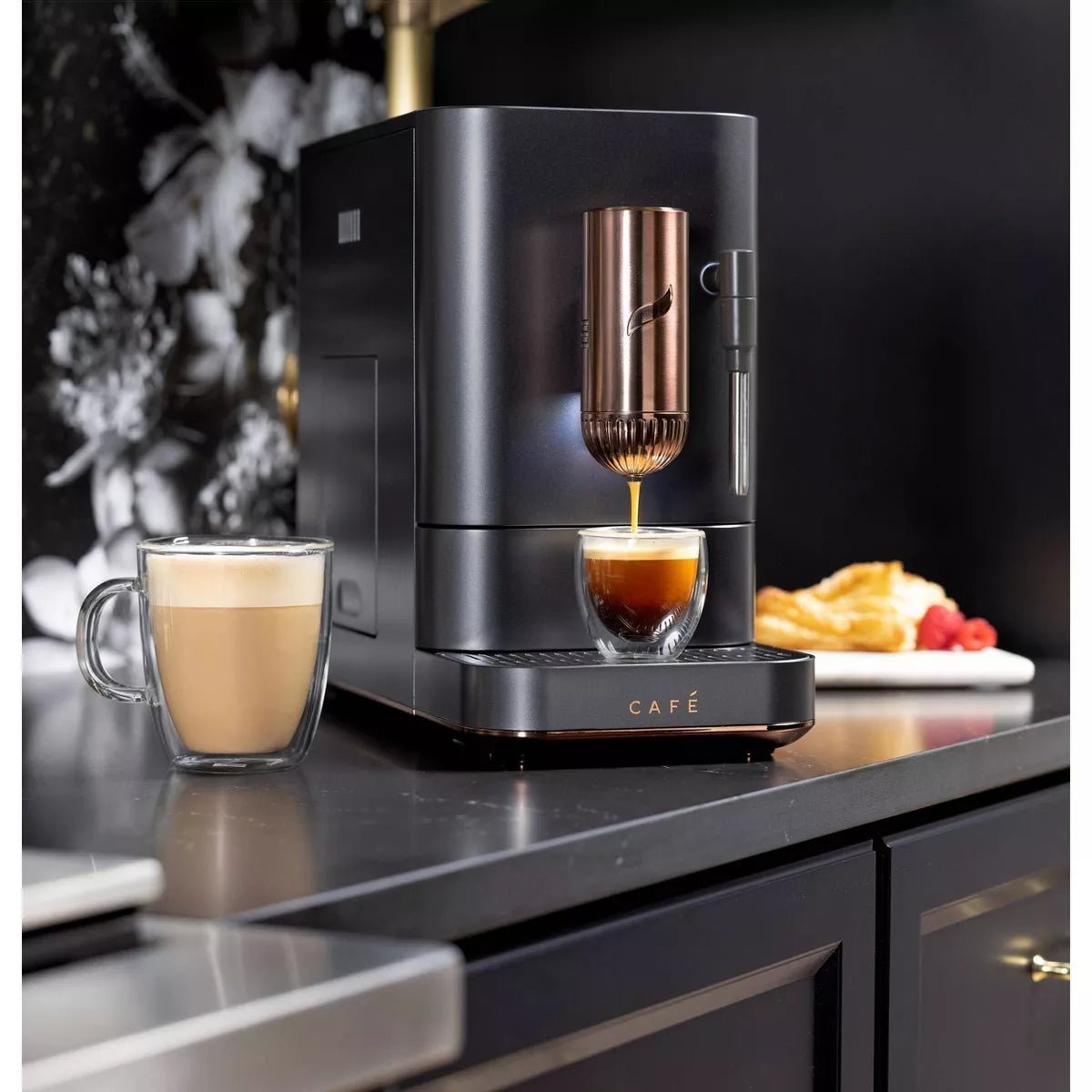
The Café Affetto is a bean-to-cup automatic espresso machine by Café Appliances (a premium brand by GE Appliances). It grinds, tamps, and brews entirely automatically — one press of a button delivers a shot in under 90 seconds. It's WiFi-connected, app-enabled, and built around a stainless steel conical burr grinder with 5 grind settings. This guide covers everything: first use setup, one-touch brewing, the SmartHQ app, grind adjustment, milk frothing, cleaning the brew unit, and troubleshooting.
View the Café Affetto at Altohaus →
What's in the Box
- Café Affetto automatic espresso machine
- Stainless steel frothing pitcher (15.8 oz, with measurement markings)
- Water reservoir
- Drip tray and grounds drawer
- Cleaning brush
- Microfiber cleaning cloth
- Owner's manual
Key Specifications
| Brand | Café Appliances (GE Appliances) |
| Type | Bean-to-cup automatic espresso machine |
| Colors available | Matte White, Matte Black |
| Pump pressure | 20-bar rated pump |
| Pre-infusion | Yes — automatic, low-pressure bloom before extraction |
| Built-in grinder | Stainless steel conical burr grinder |
| Grind settings | 5 levels (coarsest to finest) |
| Bean hopper capacity | 6 oz |
| Brew time | Under 90 seconds from press to cup |
| Brew functions | Espresso, Americano, Lungo, My Cup, Hot Water, Steam |
| WiFi connected | Yes — SmartHQ app (iOS and Android) |
| Steam wand | Yes — rotates 90° for convenience |
| Frothing pitcher included | Yes — 15.8 oz stainless steel |
| Warranty | 1-year limited manufacturer warranty (GE Appliances) |
| Support | cafeappliances.com / 1-800-952-5539 |
Control Panel Overview
- Power — turns the machine on and off
- Espresso — brews a single shot (~30ml). Default: 8–12g coffee
- Americano — espresso followed by hot water for a longer drink
- Lungo — longer espresso with more water (~100ml). Select models only
- My Cup — customizable preset. Default: ristretto (~15ml). Adjust via SmartHQ app only
- Steam — activates steam wand for milk frothing
- Hot Water — dispenses hot water from the steam wand spout
First Use: Setting Up Your Café Affetto
- Remove all packaging from the machine, drip tray, and grounds drawer.
- Fill the water reservoir with fresh cold water to the MAX line and insert it firmly.
- Add whole coffee beans to the bean hopper — open the lid and pour in up to 6 oz of beans. Do not add pre-ground coffee.
- Power on using the Power button. The machine will heat up and run an initialization cycle.
- Prime the machine — place a container under the brew spout. Press the Espresso button to run a flush cycle without a cup. Discard the output. Repeat once more. The machine is now primed and ready.
- Preheat your espresso cup by pressing the Hot Water button and letting hot water fill the cup, then discard. This ensures your shot stays hot longer.
How to Brew — One-Touch Operation
The Café Affetto is fully automatic. To brew any function:
- Ensure the water reservoir is filled and the bean hopper has beans
- Place your cup under the dispenser spout
- Press the desired button — Espresso, Americano, Lungo, or My Cup
- All other buttons will go dark. The machine grinds the beans, tamps automatically, and begins extraction
- The machine stops automatically when the programmed volume is reached
From press to cup takes under 90 seconds. No manual steps required.
Adjusting Grind Size
The built-in conical burr grinder has 5 grind settings — 1 (finest) to 5 (coarsest). Adjusting grind size affects shot strength and extraction quality.
- Finer grind (lower number) — slower extraction, stronger, more intense flavor
- Coarser grind (higher number) — faster extraction, lighter, more diluted flavor
To adjust:
- Open the bean hopper lid
- Turn the grind size dial while the machine is grinding — adjust during an active brew cycle for the change to take effect immediately
- Align the desired grind circle to the arrow on the grinder top
SmartHQ App — WiFi Setup and Features
The Café Affetto connects to GE Appliances' SmartHQ app, available free on iOS and Android. The app allows you to customize drink preferences, receive maintenance alerts, and enable software updates.
Connecting to WiFi
- Download the SmartHQ app from the App Store or Google Play
- Open the app and sign in or create a GE Appliances account
- On the Home screen, press the Plus (+) to add an appliance
- Select Countertop Appliances → Espresso → Auto Espresso
- On the machine, press and hold the Espresso and Americano buttons simultaneously for 3 seconds to activate WiFi pairing mode. The machine will beep and the WiFi icon will illuminate
- Follow the in-app instructions. When prompted for the GE Appliances module password, it's printed on the label on the back of the machine (under the water tank)
- Once connected, the app will display "Congratulations! Enjoy your Connected Appliance!"
What the SmartHQ App Does
- My Cup customization — the only way to change the My Cup preset from its default ristretto setting. Adjust volume and strength to your preference
- Maintenance alerts — notifies you when to empty the grounds bin, refill the bean hopper or water reservoir, empty the drip tray, and when descaling is needed
- Software updates — keeps the machine's firmware current
- Remote monitoring — check machine status from your phone
Frothing Milk with the Steam Wand
- Always brew espresso first — the machine requires higher temperature for steam than for espresso. Brewing immediately after steaming affects shot quality.
- Press the Steam button. The machine will preheat — the steam wand may purge hot water during this phase. Wait until it's ready before inserting the wand into milk.
- Rotate the steam wand 90° to position it over your frothing pitcher.
- Fill the pitcher with cold milk (dairy or non-dairy). Higher fat content creates creamier, thicker foam. Lower fat creates lighter, larger-bubble foam.
- Submerge the tip just below the milk surface at approximately a 45° angle to create a swirling vortex.
- Start steaming. The longer the tip stays just below the surface, the more microfoam is created. Once you have the desired foam, dip the wand lower into the milk to heat it to your desired temperature.
- Press Steam again to stop. Remove the pitcher.
- Wipe the steam wand immediately with a damp cloth. Use a small brush to clear the steam nozzle if needed.
Cleaning & Maintenance
Daily
- Empty and rinse the magnetic drip tray and internal coffee grounds drawer
- Wipe the steam wand with a damp cloth after every use
- Rinse and refill the water reservoir with fresh water
Cleaning the Brew Unit
The coffee brewer unit is removable for thorough cleaning. To access it:
- Remove the service door on the side of the machine
- Pinch both orange tabs to release the brewer unit
- Use the included cleaning brush and microfiber cloth to wipe away coffee grounds and residue
- Rinse under warm water — do not use soap on the brew unit
- Allow to air dry before reinserting
Descaling
The machine alerts you (via the SmartHQ app or indicator light) when descaling is needed. Use a descaling solution recommended for automatic espresso machines — follow the descaling procedure in the owner's manual or via the SmartHQ app guided cleaning function. Frequency depends on water hardness and usage, typically every 2–3 months.
Troubleshooting Common Issues
Machine doesn't turn on
Check the power connection and ensure the outlet is working. If the machine was recently moved or stored, run a priming cycle (flush without beans) before attempting to brew.
Coffee doesn't come out of the spout
The bean hopper may be empty or the grinder may be jammed with oily beans. Oily beans are not recommended for automatic machines — they can clog the grinder. Check the hopper and add fresh, dry-roasted beans if needed. If the issue persists, clean the brew unit.
Coffee is dispensing slower than normal
Grind is too fine or the machine needs descaling. Adjust the grind one step coarser. If the issue continues, run a descaling cycle.
Espresso shot has no crema
Coffee beans may be stale or the grind is too coarse. Use freshly roasted beans (within 4 weeks of roast date) and try a finer grind setting. Avoid very light roasts — darker roasts generally produce better crema in automatic machines.
Grinder is making a sharp, loud noise
A foreign object (stone, debris) may have entered the grinder with the beans. Turn off the machine immediately and contact Café Appliances support before resuming use.
Add/Stir Beans indicator is on
The bean hopper is empty or oily beans are blocking the grinder chute. Refill with fresh whole beans and stir gently. If the alert doesn't clear, the beans may be too oily — switch to a drier roast.
Add Water indicator is on
The water reservoir is empty or not properly seated. Remove, fill to MAX, and reinstall firmly. If the indicator appeared mid-cycle, add water and press the desired function button to resume.
Steam wand not producing enough microfoam
Use cold milk straight from the refrigerator — room temperature milk doesn't froth well. Position the wand tip just below the surface (not submerged). Clean the steam nozzle if blocked. Higher fat milk produces better results.
Coffee brewer or disposal drawer won't remove
The machine must be powered on to release the brew unit. Ensure the machine is on before attempting to remove either component for cleaning.
Official Café Appliances Resources
- Café Espresso Machine Use & Care Tips — official tips for brewing, steaming, and maintenance
- SmartHQ App Connection Guide — official step-by-step WiFi setup instructions
- Café Affetto Owner's Manual — ManualsLib — full PDF manual with diagrams
- GE Appliances Product Support Page — owner's manual and support for the Affetto
- Café Appliances Customer Support: 1-800-952-5539
- SmartHQ / Connected Home Support: 1-800-220-6899 (Mon–Fri 9am–9pm ET, Sat 9am–3pm ET)
- Download SmartHQ: Available on the App Store and Google Play
Warranty Information
The Café Affetto is covered by a 1-year limited manufacturer's warranty from GE Appliances. Register your appliance and manage warranty claims at cafeappliances.com or by calling 1-800-952-5539.
For questions about your Altohaus order, contact us at support@altohaus.co.
Pair It With
- Quality whole bean coffee — the Affetto has a built-in grinder, so no separate grinder is needed. Use fresh, whole bean coffee from a specialty roaster for best results. Avoid excessively oily beans.
- Extra frothing pitcher — the included 15.8 oz pitcher is a good size. A second pitcher is handy for households that make multiple milk drinks. Browse accessories →
Shop the Café Affetto at Altohaus →
Frequently Asked Questions
Can I use pre-ground coffee in the Café Affetto?
No — the Café Affetto uses whole beans only. The machine has a built-in conical burr grinder that grinds fresh for every shot. Adding pre-ground coffee to the bean hopper will jam the grinder.
How do I customize the My Cup setting?
My Cup can only be customized through the SmartHQ app. The default is a ristretto (~15ml). Connect the machine to the app via WiFi, then navigate to the My Cup settings to adjust volume and strength to your preference.
What coffee beans work best in the Café Affetto?
Medium to dark roast whole beans work best. Avoid very oily beans (often dark French or Italian roasts) — oily beans can clog the grinder and trigger the Add/Stir Beans alert. Fresh beans roasted within 4 weeks produce better crema and flavor.
How do I adjust the grind size?
Open the bean hopper lid and turn the grind dial while the machine is actively grinding — the smallest circle is the finest grind (1), the largest is the coarsest (5). Only adjust during a live grind cycle. Change one step at a time and allow 2 shots before evaluating the result.
How do I connect the Café Affetto to WiFi?
Press and hold the Espresso and Americano buttons simultaneously for 3 seconds to activate pairing mode. Then follow the setup steps in the SmartHQ app. The WiFi password is on the label on the back of the machine. For connection issues, ensure your phone is on a 2.4GHz network during setup.
Does the Café Affetto make lattes and cappuccinos?
Yes — brew your espresso first, then use the steam wand to froth cold milk. Pour the frothed milk over the shot to make a latte or cappuccino. The included stainless steel pitcher (15.8 oz) is sized for making milk drinks.
Where can I find the Café Affetto manual?
The full owner's manual is available on ManualsLib and via the GE Appliances product support page. The SmartHQ app also includes guided maintenance and cleaning instructions.
Share:
De'Longhi Dedica Duo Espresso Machine: Complete Setup, Use & Care Guide
Café Bellissimo Semi-Automatic Espresso Machine: Complete Setup, Use & Care Guide